
Short answer: To audit a new website after 3 months, work through ten steps: record your baseline in Google Search Console, check which pages are indexed, find pages ranking 5 to 15 with low clicks, read your real search queries, fix technical leftovers, count internal links, test speed on mobile, check your Google Business Profile, confirm your brand data, then plan the next three months. Update existing pages first, and write new ones second.
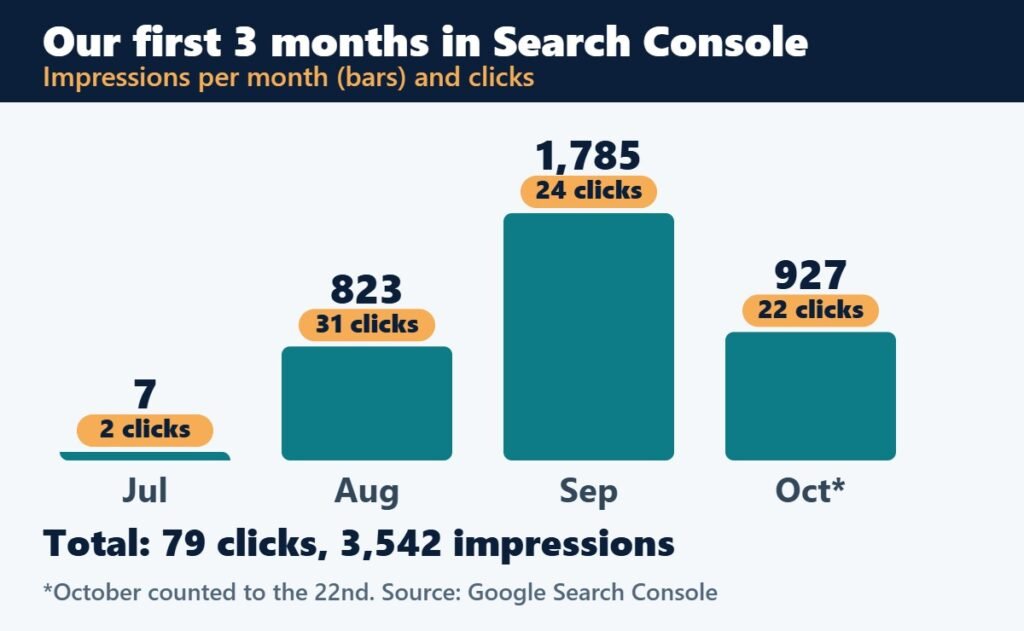
Our own website is three months old. In that time it earned 79 clicks and 3,542 impressions in Google Search Console. Those are small numbers, and we are sharing them anyway, because small numbers are exactly where a good audit starts. They show you what Google has found, what people searched for, and where your pages are leaking clicks.
This is the step-by-step audit we use on young websites. We also ran it on our own site, unnatidigiservices.in, after its first three months, so you will see real examples along the way.
What to expect at the 3-month mark
Numbers will be small, and that is normal. A site this young is still being crawled, tested and compared against older competitors. Your goal at this stage is not to celebrate or panic. It is to find out what Google sees, fix what is blocking it, and improve the pages that are already close to getting clicks.
Set aside two to three hours, open Google Search Console, and keep a notes sheet. Here is the full checklist at a glance:
| Step | Where to look | What you are looking for |
|---|---|---|
| 1. Baseline | Search Console, Performance | Clicks, impressions, CTR and average position for 3 months |
| 2. Indexing | Search Console, Pages | Which pages are indexed, and why others are not |
| 3. Quick wins | Performance, Pages tab | Pages at position 5 to 15 with many impressions and few clicks |
| 4. Queries | Performance, Queries tab | What people actually search, and which page answers it |
| 5. Technical | Sitemap, redirects, robots | Broken sitemap, old URLs, duplicates, noindex mistakes |
| 6. Internal links | Your own site | Pages with fewer than 3 links pointing to them |
| 7. Speed | PageSpeed Insights | LCP, layout shift, oversized images, accessibility |
| 8. Business Profile | Google Business Profile | Name, address and phone match your website |
| 9. Brand data | Search results, schema | Business name, structured data, old brand names |
| 10. Plan | Your notes | Update first, then write new content |
Step 1: Record your baseline
In Search Console, open Performance and choose Search results. Set the date range to the last 3 months and switch on all four metrics: total clicks, total impressions, average CTR and average position. Write the four numbers in your sheet. Then look at the Queries, Pages, Countries and Devices tabs and export the data.
These four numbers are your starting line. Check them again every month, so you can tell whether your changes are working.
From our own audit: in its first three months our site had 79 clicks and 3,542 impressions. Around two thirds of the clicks came from mobile, and all of them came from India. Small numbers, but the pattern told us where to work.
Step 2: Check what Google has indexed
Open Indexing then Pages in Search Console. You will see which pages are indexed and which are not, with a reason for each. Three reasons come up most often:
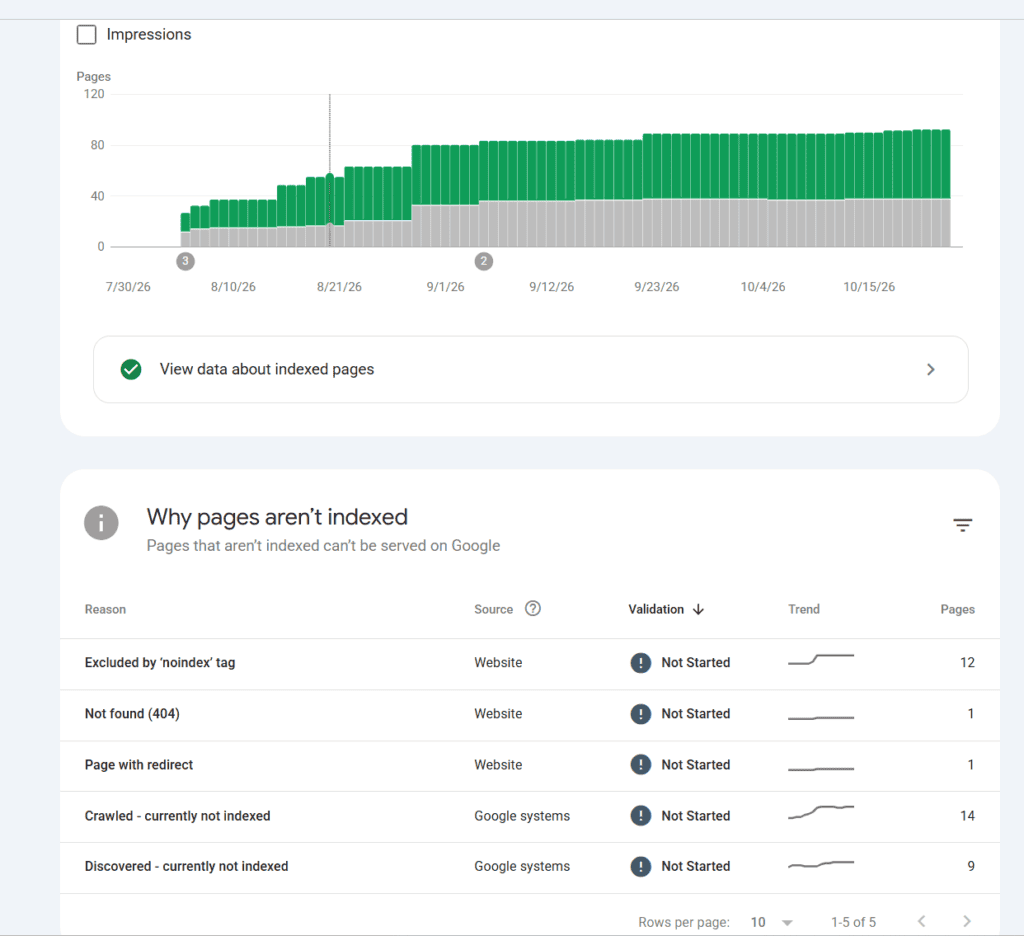
- Crawled, currently not indexed: Google visited the page but did not think it was worth adding yet. This usually means the page is thin, repeats another page or has few links pointing to it. Improve the content and add internal links.
- Discovered, currently not indexed: Google knows the address but has not crawled it. Make sure the page is in your sitemap and linked from other pages.
- Excluded by noindex tag: Fine if you chose it, for example for tag or search pages. A problem if it is on a page you want found.
Use the URL Inspection tool on your key pages to see how Google sees them. After you improve a page, request indexing once. Do not submit the same pages again and again.
Step 3: Find the pages that are close to getting clicks
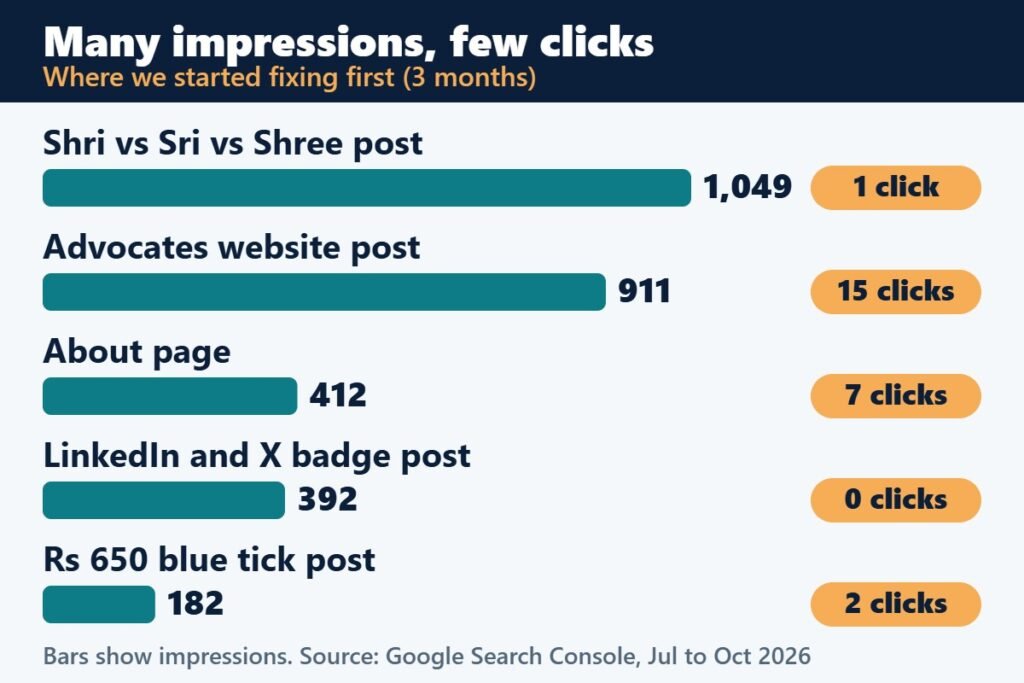
Go to Performance and open the Pages tab. Look for pages with many impressions, an average position between 5 and 15, and very few clicks. These pages are already visible, so a better title and opening can turn impressions into visitors quickly.
For each of these pages:
- Put the exact phrase people search for into the title and the first heading.
- Rewrite the meta description so it promises a clear answer.
- Add a short answer in the first two lines, followed by a table or list.
- Add a short FAQ that answers the related questions you see in your queries.
From our own audit: one of our posts had more than 1,000 impressions at around position 9 but only one click. People were searching for a plain comparison, and our title was about something else. We changed the title, added a short answer with a table at the top, and added an FAQ.
Step 4: Read your real search queries
Open the Queries tab and read it like a customer would. Group the queries by what the searcher wants, then check that each group has a page that answers it. If a query has impressions but no page really covers it, that is a content gap: add a section to an existing page, or plan a new post.
Also watch for surprises, such as old business names, spelling variations and questions you never wrote about. They tell you what your audience really asks.
Step 5: Fix the technical leftovers
New sites often carry small technical problems from the build. Check these five:
- Sitemap: open your sitemap address in a browser. It should show a list of pages, not an error. Submit it in Search Console.
- Old and duplicate addresses: if old URLs still get impressions, redirect them with a 301 to the page that replaced them.
- Robots and noindex: make sure important pages are not blocked, and that pages you want hidden are marked noindex.
- Canonical tags: each page should point to itself unless it is a true duplicate.
- Broken internal links: click through your menu and key pages and fix any that fail.
From our own audit: our sitemap address was returning a 404 error even though it was set up. Re-saving the permalink settings fixed it. We also found old product and duplicate addresses still showing up in Search Console, and redirected them.
Step 6: Count your internal links
Internal links tell Google which pages matter and help visitors move through your site. List your important pages and count how many other pages link to each one. A page with fewer than three links pointing to it is easy to miss.
Add links where they feel natural, inside the text, with clear anchor words rather than “click here”. For example, if you mention how Google ranks local results, link to a guide on relevance, proximity and prominence. A simple rule we use: three to five links in a post, six to eight on a key page, and about twelve to fifteen on the homepage.
Step 7: Test speed and mobile
Run PageSpeed Insights on five to eight important pages, using the mobile result. Look at three Core Web Vitals: Largest Contentful Paint should be 2.5 seconds or less, Interaction to Next Paint 200 milliseconds or less, and Cumulative Layout Shift 0.1 or less.
The usual quick win is oversized images. Serving smaller versions to phones can cut seconds off the load. Also check the accessibility score: low text contrast and skipped heading levels are easy to fix.
From our own audit: our Portfolio page scored 88 on mobile because large screenshots loaded at full size. After serving right-sized images, it scored 97 and its Largest Contentful Paint fell from 3.3 to 2.1 seconds.
Step 8: Check your Google Business Profile
For a local business, your profile matters as much as your website. Check that your business name, address and phone number are identical on the profile and on your website. Look at your categories, photos, reviews and posts, and at the profile performance data for calls and direction requests.
If your map pin is in the wrong place, this story shows how one shop owner fixed a wrong pin. For a full list of things to complete, use our Google Business Profile checklist.
Step 9: Check your brand and structured data
Search for your business name and see what appears. Then test your structured data, the hidden code that tells search engines who you are. Check that the organisation name is your business name, and that your address, phone number and logo are correct. Also search for old names your business used before and mention the change on your About page.
From our own audit: we found our structured data listed the founder’s personal name as the organisation. We corrected it to the business name and added a separate profile for the founder, so search engines can tell the two apart.
Step 10: Plan the next three months
Turn your notes into a short plan, in this order:
- Week 1: fix redirects, the sitemap, titles and meta descriptions on your near-miss pages.
- Month 1: improve your top five pages with answer boxes, FAQs and internal links.
- Months 2 and 3: write new pages for the queries that no page answers yet.
- Every month: repeat Step 1 and compare your four baseline numbers.
Skip the shortcuts. Fake reviews, bought links and social media blasts can damage a young site and are not worth the risk. Slow, honest improvements add up.
What we changed after our own audit
Here is what came out of our audit, so you can see what a real round of fixes looks like:
- Rewrote the titles, short answers and FAQs on our most-viewed pages.
- Fixed the sitemap and redirected old and duplicate addresses.
- Corrected our business name in structured data.
- Made sure every page has enough internal links pointing to it.
- Resized images and fixed colour contrast, which lifted our Portfolio page from 88 to 97 on mobile.
- Added the questions customers ask to our FAQ page, including what we do and do not offer.
It is too early to claim results, and we will not pretend otherwise. Next month we will check the same four numbers from Step 1 and compare them.
Want an expert to audit your site?
If you would rather have this done for you, our SEO audit report covers the technical checks and gives you a prioritised list of fixes. If you also want ongoing help, see our SEO services in Mysuru. You can also read the best local SEO tools and what local SEO costs in Mysuru before you decide.
SEO audit after 3 months: common questions
When should I do my first SEO audit on a new website?
After about three months, when Google Search Console has enough data to show real patterns. If nothing is being indexed after the first few weeks, check indexing earlier. After that, repeat a lighter version every quarter.
How long does SEO take for a new website?
It depends on your competition, your content and your location, but it usually takes months, not weeks. No one can honestly promise a ranking date. The first three months are about getting indexed and learning what Google shows for your pages.
What tools do I need for an SEO audit?
You can do the core audit with free tools: Google Search Console, PageSpeed Insights and your Google Business Profile. Paid tools help when you manage many pages or locations. See our guide to local SEO tools for what is worth paying for.
Should I delete pages that are not indexed?
Not as a first step. Improve them, add internal links, or merge thin pages into a stronger one. Delete a page only when it has no value, and redirect its address to the closest useful page.
What is a good click-through rate in Search Console?
There is no single good number, because it depends on the position and the type of search. Compare your pages with each other and with their own past results. A page with many impressions and very few clicks is the one to fix first.
Can I do an SEO audit myself?
Yes. Steps 1 to 7 need only free tools and a few hours. If you would rather have an expert review, a professional SEO audit report covers the same ground and gives you a prioritised fix list.