
A Real-World Google Maps Case Study
Sometimes, a case comes along that humbles you.
This was one of them.
The business belonged to an auditor practicing on busy NS Road, Mysuru. He had been operating from the same office for more than 25 years. Local shopkeepers knew him. People in the area knew where his office was. For years, first-time visitors would simply call him for directions, and he would patiently guide them landmark by landmark until they reached the building. It had become a routine part of his day.
But on Google Maps?
Nothing.
No business profile. No visible pin for the office.
Interestingly, two advocate offices in the same building were also missing from Google Maps!
Then came the challenge: could we get a well-established, real-world business with more than two decades of history properly listed on Google Maps?
Within 48 hours, the answer was yes.
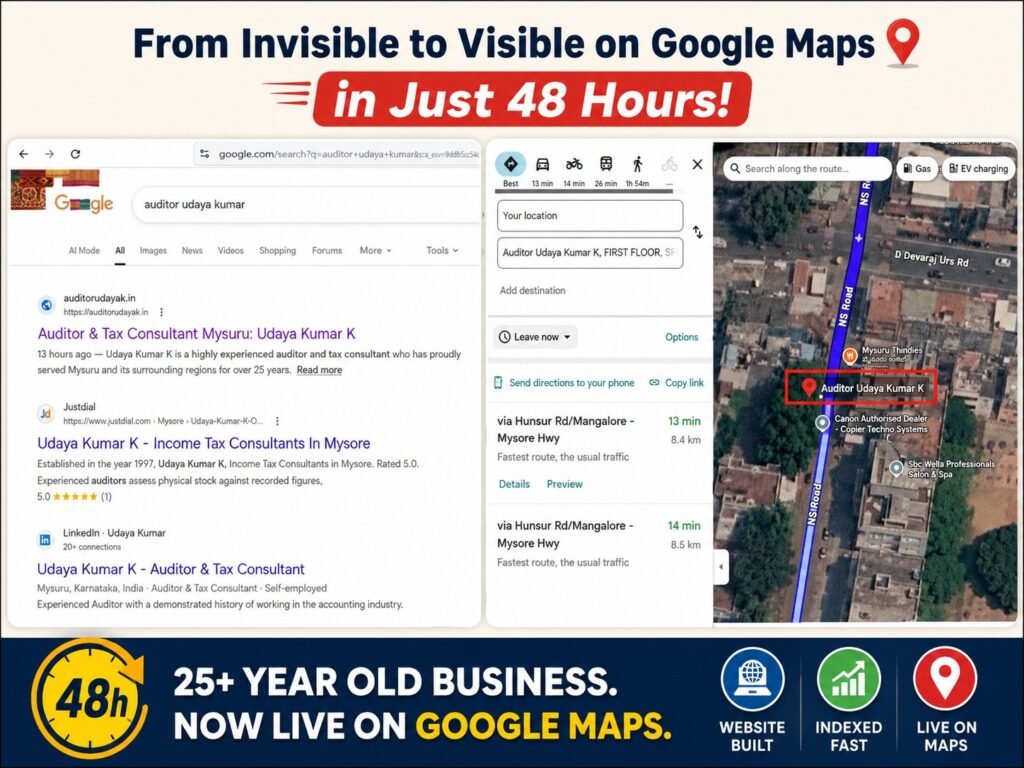
Important note: This is not a Google Maps verification hack, nor an official explanation of how Google’s systems make verification decisions. This is a real-world case study documenting what we tried, what failed, what we observed, and the sequence of events that ultimately resulted in the business appearing on Google Maps.
The Problem: A Real Business That Google Maps Could Not See
The physical location itself created an interesting challenge.
A large tree partially covered the building from above. Satellite imagery did not provide a particularly clear view of the office. The entrance and first-floor location were not immediately obvious from aerial imagery either.
That meant this was not simply a case of typing in a business name and expecting Google to instantly understand the location.
The question became:
How do you establish a strong enough digital presence around a completely new Google Business Profile for a business that has existed offline for more than 25 years?
I have been working in digital marketing and SEO for more than two decades. I have worked on generic keywords, product keywords, established local businesses, and websites targeting markets including the US and UK.
But this was different.
This was my first attempt at building a Google Maps presence from the ground up for this type of established Indian professional practice.
And one thought kept coming back.
The office was older than Gmail.
The client had been practicing long before Google Business Profiles became part of everyday business marketing. Could Google already have signals about the person, profession, location or business scattered across the web?
There was no way to know.
So we treated it as an experiment.
Step 1: Build a Website Before Building the Maps Presence
The first decision was simple.
Before attempting to establish the Google Maps presence, we created a simple five-page professional website using the Unnati GeoRank platform.
The objective was not to create a huge website.
It was to establish a clear and consistent digital identity:
- Who is the professional?
- What services does he offer?
- Where is the office located?
- What should a potential client know before contacting him?
As a registered GST practitioner myself, I already understood the type of information clients typically look for when approaching an auditor or tax professional.
That made the content development relatively straightforward.
No generic AI-style service descriptions. No unnecessary marketing language.
Just a clear professional website explaining the practice and its services.
Step 2: Get the Website Indexed
Once the website was ready, it was submitted to Google Search Console.
The site was indexed within approximately 12 hours.
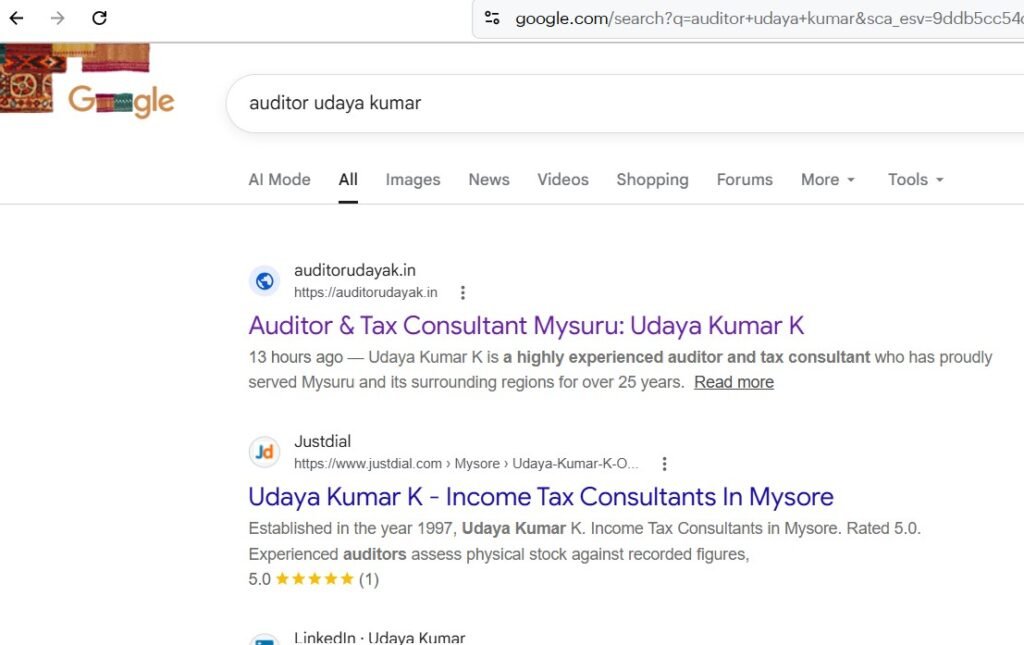
That was encouraging.
The client’s existing Gmail account was then added to Search Console and given ownership access to the website.
This was also deliberate.
The business profile would be created and owned by the client using his own long-standing Google account. My role was to assist with setup and optimization without taking ownership of the business identity.
Whether the age of the Gmail account played any role in the eventual outcome cannot be proven.
But from a practical perspective, using the genuine business owner’s established account made more sense than creating an artificial new identity solely for the listing.
At this point, we had:
- A real professional.
- A real physical office.
- A website describing the professional and services.
- A website indexed by Google.
- A Google account genuinely belonging to the business owner.
Then came the difficult part.
Step 3: Create the Google Business Profile
I visited the office personally.
The client created the Google Business Profile using his own Gmail account.
My account was added to assist with the optimization and management process, while the client retained ownership of his business profile.
The physical location, however, remained the biggest challenge.
The building was not especially easy to establish visually from satellite imagery.
So we looked for something Google Maps already clearly recognised nearby.
And we found it.
A Nearby Business Became Our Visual Reference Point
On the ground floor of the same building was a dry fruits shop that was already present on Google Maps.
That gave us a recognisable starting point.
The idea was simple:
Start from a clearly identifiable location on the ground floor, walk through the building access route, climb the stairs and end at the client’s first-floor office.
We recorded a continuous walk-through video and also captured photographs of the building and office.
The logic was to provide as much real-world visual context as possible.
But the first attempt did not go smoothly.
Every Upload Got Rejected!
The photographs and videos did not initially produce the result we expected.
Every upload was rejected.
This was frustrating, but it also turned the process into a useful learning experience.
A few possible issues stood out.
1. The Photos Were Shot on an iPhone
The original images were captured using an iPhone.
Depending on the upload workflow and platform support, image format compatibility can become an issue. The original files were not standard JPEG files.
So image format became one of the things we examined.
2. Location Information May Not Have Been Preserved
Location metadata can be affected by device settings and by the way images are transferred between apps and platforms.
For example, sending photographs through messaging apps may alter or remove some original metadata.
We therefore paid closer attention to preserving the original files and their available location information.
3. The Video Was Recorded Using the Standard Camera App
The initial walk-through video was recorded using the regular iPhone Camera app.
For the next attempt, the plan was to use Google’s own Maps or Business Profile workflow wherever possible rather than treating the verification process like an ordinary video upload.
The goal was simple: provide Google with the clearest possible connection between the real-world journey and the listed business location.
4. The Owner Needed to Remain Central to the Process
Because this was a completely new listing, we also wanted the genuine business owner to remain directly involved in the creation and verification process.
Again, I cannot claim that manager access or account roles caused any of the earlier rejections.
But for a new business profile, using the actual owner’s established Google account is simply a cleaner and more defensible approach.
Then Something Interesting Happened
Despite the rejected uploads and the uncertainty around the verification attempts, the business listing went live.
No postcard.
No lengthy exchange with Google support.
No weeks of waiting.
Within approximately 48 hours of beginning the process, the office was visible on Google Maps.
And this is where the screenshot becomes important.
The result was no longer theoretical.
Google Maps could identify the destination as:
Auditor Udaya Kumar K
The listing appeared at the actual office location, and Google Maps could generate directions to it from the user’s location.
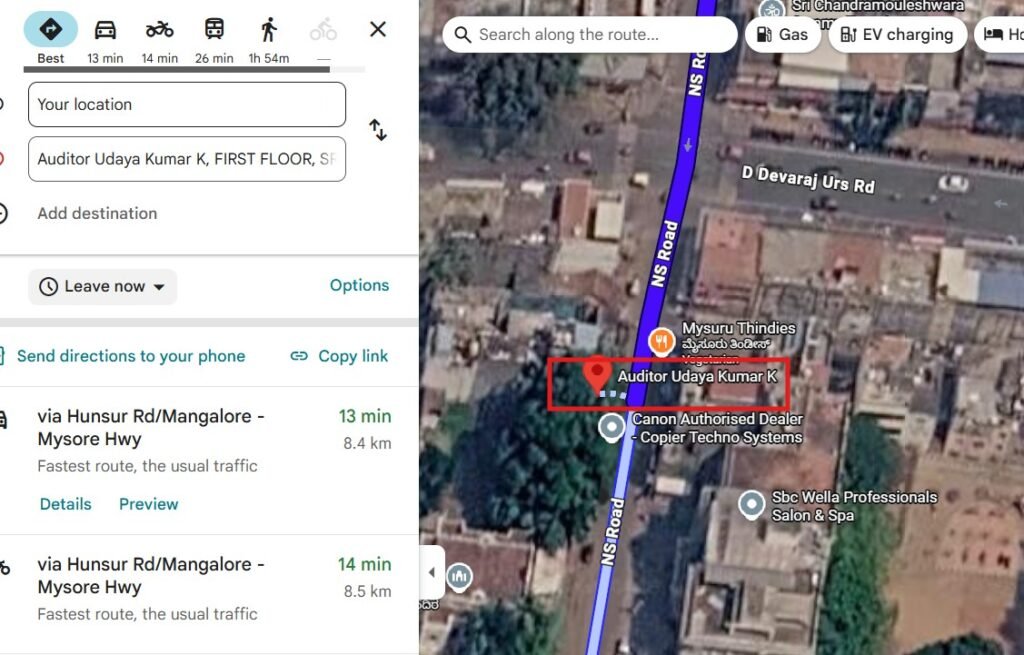
The Google Maps result showing the newly listed Auditor Udaya Kumar K office and directions to the location.
For a business that had existed offline for more than 25 years, this was more than just a digital milestone. It solved a very real, everyday problem the client had dealt with for years.
For years, he had been tired of giving directions to first-time visitors—explaining landmarks, turns, and reference points over phone calls multiple times a day. Now, instead of explaining the route repeatedly, he could simply say: “Search on Google Maps.”
That alone changed his daily workflow.
So What Actually Worked?
The honest answer is:
I don’t know exactly.
And I think that is more useful than pretending to have discovered a secret Google Maps formula.
I cannot prove that any one of these factors caused the listing to go live:
- The newly created website.
- Fast indexing of the website.
- The client’s long-standing Google account.
- The use of the actual business owner as profile owner.
- The proximity of an already established business in the same building.
- The visual documentation of the route to the office.
- The photographs and videos submitted during the process.
- Or Google’s own internal verification systems independently recognising enough information to approve the location.
Most likely, there was no single magic button.
The important part may have been the overall consistency of signals.
A real person.
A real professional practice.
A real office.
A real Google account belonging to the business owner.
A newly indexed website.
A clearly identifiable address.
And eventually, a live Google Maps listing at the correct location.
The Biggest Lesson: Don’t Start With the Pin
Many business owners think Google Maps visibility begins and ends with creating a Google Business Profile.
This case made me think differently.
For a completely new local presence, especially where the physical location is difficult to interpret visually, it may be worth building the broader digital foundation first.
In this case, the sequence was:
Step 1: Establish the professional identity
Create a clear website explaining the person, profession, services and location.
Step 2: Help Google discover the website
Submit the site through Google Search Console and allow Google to index the information.
Step 3: Create the Business Profile using the real owner’s account
The client should remain in control of the business identity.
Step 4: Provide clear real-world evidence of the location
Document the building, entrance, office and surrounding landmarks using the available Google workflow.
Step 5: Keep the information consistent
The name, profession, address and contact details should not contradict each other across the website and business profile.
What I Would Do Differently Next Time
This experiment also produced a practical checklist for future cases.
1. Prepare the digital foundation first
Don’t wait until verification becomes difficult before creating a proper website.
A website gives Google and potential customers another consistent source of information about the business.
2. Use the actual business owner as the primary account holder
The business should belong to the business owner, not the agency, consultant or web developer.
Managers can be added later for assistance.
3. Preserve original photographs
Avoid unnecessary forwarding, compression or repeated conversion before submitting business photographs.
4. Pay attention to file compatibility
If a particular file format is not being accepted or processed properly, try a standard web-friendly format such as JPEG where appropriate.
5. Document the physical journey to the office
When a building is difficult to identify, think from the perspective of someone visiting for the first time.
What landmark can they recognise?
Where is the entrance?
How do they reach the office?
6. Use nearby landmarks as reference points
A recognised neighbouring business cannot be assumed to influence Google’s verification decision.
However, it can help humans—and potentially mapping systems—understand the physical context of a location.
7. Don’t panic when the first attempt fails
Rejected uploads do not necessarily mean the business cannot be listed.
Sometimes the process simply requires better documentation, cleaner files or patience while Google’s systems process available information.
A Tree Can Hide a Building. It Doesn’t Have to Hide the Business.
This case started with an unusual problem.
A 25-year-old business was well known in its neighbourhood but practically invisible on Google Maps.
Today, someone can search for the office, see its location and request directions.
The screenshot is the outcome.
But the bigger lesson is not that we found a secret way to manipulate Google Maps.
The lesson is simpler.
Offline reputation and online visibility are two different things.
A business may have decades of trust, thousands of satisfied clients and a strong local reputation.
But if its digital identity is incomplete, Google may have very little structured information to work with.
The solution is not necessarily a complicated SEO campaign.
Sometimes, it starts with the basics:
A real website.
A clear business identity.
A consistent location.
And a Google Business Profile owned by the actual business.
For this 25-year-old Mysuru practice, that foundation was enough to finally put the business on the digital map.
Literally.