
Five years. That’s how long a shop owner’s Google Maps pin pointed to the wrong place. He tried every fix he could find. Each one got stuck on that spinning “updating” circle.
Google never answered, because Google doesn’t offer support for free services. Then he gave me access to his Business Profile. One day after my final step, the pin landed right on his front door. Here’s what I tried, what failed, and the one thing I still can’t explain.
No one to call at Google
Google does not offer customer support for its free services. That includes Google Business Profile (GBP), Google Maps and Search results.
The official help guides exist. But they are vague. They tell you what should happen, not what to do when it doesn’t.
So when something breaks, you guess. You post on Facebook groups. You ask on Reddit. You try LinkedIn. And you wait.
Recently, a shop owner asked me for help. His shop’s pin on Google Maps was in the wrong spot.
He had been trying to fix it. Not for days. Not for weeks. Not even for a year or two.
He had been stuck for more than half a decade.
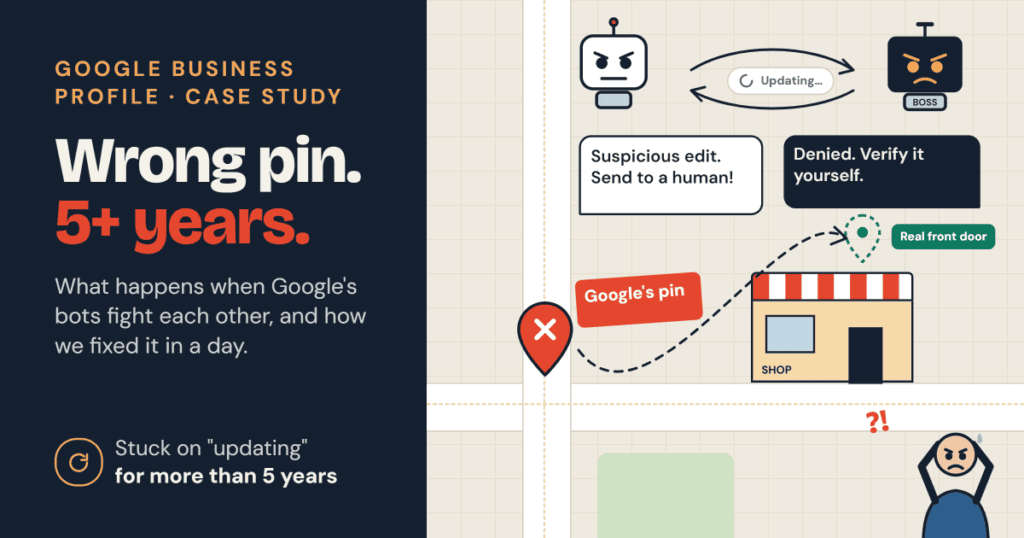
When Google’s bots fight each other
Google runs on algorithms. Bots decide almost everything. Humans rarely step in.
Here is my theory of what happens. It is not official. But it explains what I saw.
You change something on your GBP. The first bot gets suspicious. It flags your edit for human review.
But there is a boss bot above it. Its job is to cut down human work. So it refuses the review.
The boss bot sends the edit back to the first bot. “Verify it yourself.”
The first bot can’t verify it. So it sends it back to the boss.
The boss refuses again. Less human work, remember?
And round and round it goes.
Meanwhile, your edit is stuck. You see that “updating” circle spinning. Forever.
So you try again. A day later. A week later. A month later.
When I asked Gemini about this, it said Google’s algorithm gets tougher with every failed attempt. That matches what I saw. The loop gets tighter. That is how one wrong pin can stay wrong for years.
It’s not just Maps
I have seen Google’s bots clash in other places too.
Take Google Ads. Its own bot can write an ad for you. You accept it as is. Not a single word changed.
Then another bot, the quality checker, reviews that same ad few days later. It flags it as a policy violation.
The result? The account can get a lifetime ban for breaking Google’s terms. Terms that Google’s own bot broke.
One bot writes. Another bot punishes. And there is no human to explain the mix-up to.
What I tried first (and what failed)
The owner gave me manager access to his GBP. I went straight for the obvious fix: move the pin.
I tried on a desktop. Then a laptop. Then my mobile.
Nothing worked. The edit never stuck.
The normal route was clearly closed. I needed a different approach.
What finally worked
The breakthrough came from a small hint by Gemini. Yes, another AI bot. Fighting bots with bots.
The idea was simple. Stop arguing with one bot. Instead, surround Google with proof of the right location from many directions.
Here is everything I did:
- Uploaded geotagged photos from an iPhone. Location turned on, taken at the shop. I included a panorama. (photos should be JPEG not HEIC)
- Uploaded more photos from a Google Pixel phone. I chose a Pixel on purpose. Surely Google would trust its own device? These included a 360-degree view.
- Pinned the correct location on my personal Google Map. One more signal pointing to the right spot.
- Built a website for the business. I embedded the correct Google Map on it.
- Added the correct location to schema markup. Search engines read this structured data directly.
- Linked the correct map on every page. In the footer and across the site, with the link title “Our shop’s real Google Map location”.
- Submitted a public map edit. I used “Suggest an edit” on Google Maps as a regular user. Google sent a confirmation, and I approved it from the owner side.
One day later, I checked the map.
The pin had moved. It now pointed right at the shop’s front door.
Five years of frustration. Fixed in a day.
So which trick worked?
Honestly? I don’t know.
Maybe it was the photos. Maybe the schema. Maybe the public edit tipped the scale. Most likely, it was all of them together.
One clue, though. Google still has not accepted the iPhone panorama or the 360-degree photo from the Pixel phone. A month later, both are still pending. Yes, even the photo from Google’s own phone.
So the panorama and 360 views were probably not what fixed the pin. The real push came from somewhere else on the list.
When Google’s bots disagree, one signal is easy to ignore. Seven signals all saying the same thing are much harder to ignore.
Your checklist if your pin is wrong
If your business pin is stuck in the wrong place, try this:
- Stop re-submitting the same pin change again and again
- Upload fresh geotagged photos from the actual location
- Use more than one phone, and add a panorama or 360 view
- Save the correct spot on your own Google Map
- Embed the correct map on your website
- Add your location to the site’s schema markup
- Link to the correct map from every page, with a clear link title
- Submit a public “Suggest an edit” on Google Maps
- Approve the suggestion from your GBP when Google asks
- Wait a day or two before checking
Google won’t pick up the phone. But it does listen to consistent evidence. Give it enough, from enough places, and even stuck bots can change their minds.
Also read > How we included a business into map which was invisible for more than 2 decades
Conclusion
Google won’t give you a phone number. It won’t explain its bots. And its help guides go quiet the moment an edit gets stuck.
But Google does notice evidence. Photos, a website, schema markup, links on every page, a public map edit. All of them pointed to the same front door.
One signal is easy for a bot to ignore. Many signals from many places are much harder to ignore.
So if your pin is wrong, stop pressing the same button. Build the proof around it instead.
And if this works for you, tell me which step did the trick. I still want to know.